
Bridge Connect1.4.2 - Google Play
You'll be able to see results in few seconds.
Publisher Description

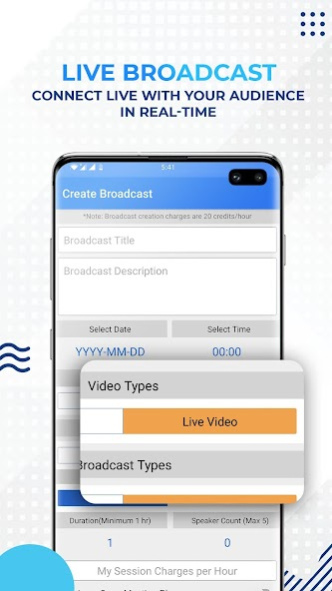
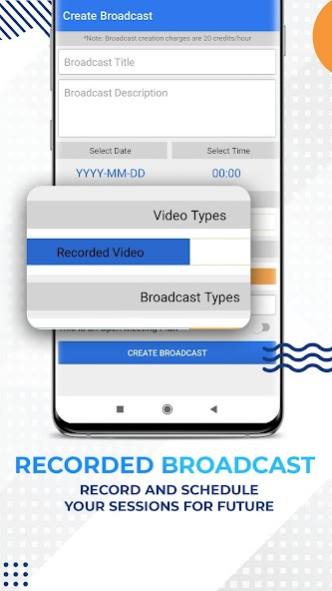

Now experience the perks of remote working with Bridge Connect.
A multidimensional, fast, and seamless video-conferencing application that enables businesses to collaborate with clients, customers, and colleagues.
Download Bridge Connect to Communicate, Connect and Collaborate. Enhance your productivity by reaching your network digitally through Broadcasting, Meetings, Whiteboard, Real-time collaboration, Group chats, and many more exciting features that lets you experience seamless networking.
Our features:
Broadcast:
This feature enables one to earn, engage, and boost productivity by planning your live or recorded broadcast and publishing them to your chosen network.
One can earn from the broadcast feature by monetizing videos in the app. A pay per view or subscription package can be set up for the live or recorded broadcast.
Document Collaboration:
Make your meetings productive by collaborating effectively with your team.
Now view, create, present, edit documents, and share with several participants in the meeting.
Now keep your context and conversation together.
Live Whiteboard:
Get creative, team up with your colleagues to visualize and draw ideas to make it a reality.
An extremely simple Whiteboard that makes your work more convenient.
Use a live whiteboard to brainstorm and demonstrate ideas like you do in real conference or meeting rooms.
Chat:
Chat with your colleagues and team members, communicate in public or private chats organized by projects, teams, or topics.
Share files, emoji, screenshots, and more
Video call:
Make crystal-clear audio and instant video calls with your team or clients.
Designed for the best video experience that makes you feel like you’re in a room even when working remotely.
Live Streaming:
Stream video with low latency rate. Stream seminars, meetings, live events, sessions and conferences using our end to end live streaming feature.
Keep your audience engaged with Bridge Connect’s live streaming feature as the video quality of the application gives seamless experience, unique multimedia that leads to better engagement.
Cross-Platform:
Cross-device compatibility helps applications to work on multiple operating systems and devices or platforms.
Bridge Connect enables people to connect seamlessly anytime and anywhere in the world.
About Bridge Connect
The company that develops Bridge Connect is Viztar. The latest version released by its developer is 1.4.2.
To install Bridge Connect on your Android device, just click the green Continue To App button above to start the installation process. The app is listed on our website since 2021-03-09 and was downloaded 0 times. We have already checked if the download link is safe, however for your own protection we recommend that you scan the downloaded app with your antivirus. Your antivirus may detect the Bridge Connect as malware as malware if the download link to com.bridge.viztarInfotech is broken.
How to install Bridge Connect on your Android device:
- Click on the Continue To App button on our website. This will redirect you to Google Play.
- Once the Bridge Connect is shown in the Google Play listing of your Android device, you can start its download and installation. Tap on the Install button located below the search bar and to the right of the app icon.
- A pop-up window with the permissions required by Bridge Connect will be shown. Click on Accept to continue the process.
- Bridge Connect will be downloaded onto your device, displaying a progress. Once the download completes, the installation will start and you'll get a notification after the installation is finished.
Program Details
System requirements
Download information
Pricing
Version History
version 1.4.2
posted on 2021-03-10
bug fixes
version 1.3.9
posted on 2021-02-11
Update App changes
Bug Fixes
version 1.3.8
posted on 2021-02-05
Meeting edit feature
Meeting time zone selection changes
Bug Fixes
version 1.3.7
posted on 2021-01-05
Send images with caption
Video trim option
Join meeting from link
Image edit options with filters
version 1.3.6
posted on 2020-12-23
Audio Recording Lock option
Wallpapers option
Image Filters
version 1.3.5
posted on 2020-11-28
Recorded broadcast watch video issue fixed
version 1.3.0
posted on 2020-07-16
- Prominent disclosure for Contacts fetch permission
- Privacy Policy option added in profile
- New UI of Profile Tab
- Minor Bug fixes
Disclaimer
Official Google Play Link
We do not host Bridge Connect on our servers. We did not scan it for viruses, adware, spyware or other type of malware. This app is hosted by Google and passed their terms and conditions to be listed there. We recommend caution when installing it.
The Google Play link for Bridge Connect is provided to you by apps112.com without any warranties, representations or guarantees of any kind, so access it at your own risk.
If you have questions regarding this particular app contact the publisher directly. For questions about the functionalities of apps112.com contact us.
